
Construction Estimating Software
Build Winning Estimates 5x Faster With Beam's AI Assistant
Turn takeoffs, plans, or notes into professional proposals in minutes.
No credit card required!
Trusted by 1,000+ contractors


%201.png)


Learns How You Estimate
Edit How You Want
Connected End-To-End

Spend time reviewing what matters
Your time is valuable. Skip the blank spreadsheet and get right to reviewing details and polishing your proposal.
The more you use it, the better it gets at matching your style and pricing.
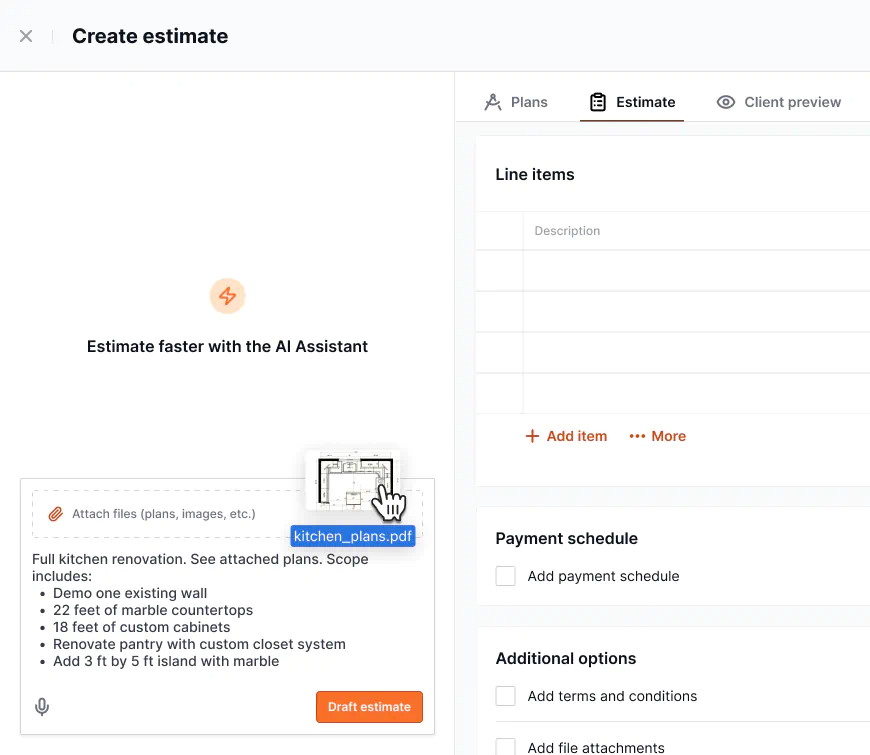
- Upload plans, takeoffs, or spreadsheets
- Provide a scope of work and exclusions to tighten the estimate
- Add instructions for formatting, price changes, and more

Customize to fit your business
With Beam's construction estimating software, you have full flexibility to customize estimates at any level:
- Sections and groups
- Items, discounts, markup
- Show or hide columns like quantity or markup
The most powerful free plan in the industry
Beam offers the most generous free plan to construction teams:
- Unlimited estimating, invoicing, and bill payment
- Five estimates using the AI Assistant
- Plus dozens of other project management features
Re-use templates and your cost library
Use templates from past projects to jumpstart similar work, build line-by-line from your saved cost library, or combine both approaches as needed.
Maintain consistent pricing across all projects and save hours of manual data entry on every estimate.

Track your sales with a full construction CRM
Improve lead tracking, estimating, and client communication with Beam's full CRM solution.
- Track leads and customer data
- Centralize customer communications
- Assign tasks for follow-up, site visits, and more

Customize estimates
Add sections, groups, items, and discounts. Customize visibility of columns and pricing.
Track email opens
Get notified when your customer has opened estimate emails to improve sales.
Collect e-signatures
Once approved, collect e-signatures on the estimate and contract.
Collect signatures and approvals on estimates & contracts
- Send estimates over email in a few clicks
- Present your proposal in the client portal
- Track digital signatures and approvals

Go from estimate to invoice in seconds
Once your proposal is approved, convert it to a project budget and send invoices in seconds to get paid faster.
With a unified estimating, invoicing, and job costing system, you can track project financials without the manual data entry.

Connect your customers to financing options to win the job
- No draws, inspections, or paperwork for the contractor
- No refinancing required—homeowners keep their low rate
- 100% free for contractors
- Loan amounts of $5k to $500k+

Frequently Asked Questions
Time is money. Save both.
Join hundreds of contractors that trust Beam to estimate, manage projects, and stay on budget.
